Archiving Framework
Purpose
The purpose of the archiving framework is to provide a structured approach to managing data archiving based on retention policies. It explains how data should be archived and eventually deleted based on a configurable retention period and archive retention period, ensuring proper data lifecycle management.
Motivation
Data archiving is crucial for ensuring that obsolete or inactive data is stored efficiently and securely, while still being accessible if needed. Over time, archived data needs to be purged to manage storage costs and maintain performance. The archiving framework enables data archiving and deletion processes which can be systematically controlled through data object and retention configurations.
Applicability
This pattern is applicable in any data solution built with the ExMeX Core Framework that requires long-term data retention for compliance or historical purposes while also needing to periodically clean up data to optimize storage. Typical scenarios include:
- Logging and monitoring frameworks
- Data solution environments
- Audit trail management
- Transactional history tracking
Structure
Retention Period Concept
The archiving process is controlled by two main variables:
- Retention Period: Defines how long data should be retained in the active (source) table before being archived.
- Archive Retention Period: Defines how long data should be kept in the archive table before being permanently deleted.
Both variables are globally set within the ExMeX Core Framework but can be customized for individual data objects as needed.
Total Retention Period Calculation:
Total Retention Period = Retention Period + Archive Retention Period
Example:
- Retention Period: 365 days (1 year)
- Archive Retention Period: 730 days (2 years)
- Total Retention Period: 1,095 days (3 years)
Data Lifecycle Visualization
Archiving Process Flow
Timeline Example
Implementation Guidelines
Overview
To implement the archiving framework, follow these steps:
- Create Archive Schema (if not exists)
- Register Data Objects for archiving
- Schedule Periodic Execution of archiving process
- Monitor Archiving Logs for success and issues
Step 1: Create Archive Schema
Before registering data objects, ensure the archive schema exists:
-- Check and create archive schema
IF NOT EXISTS (SELECT 1 FROM sys.schemas WHERE name = N'MetadataZoneArchive')
BEGIN
    EXEC('CREATE SCHEMA MetadataZoneArchive AUTHORIZATION dbo')
    PRINT 'Archive schema MetadataZoneArchive created successfully.'
END
GO
Step 2: Register Data Objects for Archiving
Use the stored procedure uspSetArchivingDataObject to register data objects for archiving.
Important Considerations:
- If the archiving table already exists, the process assumes archiving is either already configured or the table is used for other purposes
- A unique (source) data object name, schema, database, archiving column code, and is active parameter must be provided
- The archiving column must have an index for optimal performance
Example of Data Object Registration:
DECLARE @ReturnProcessStatusNumber INT

EXEC @ReturnProcessStatusNumber = MetadataZoneCore.uspSetArchivingDataObject
     @SetArchivingExec          = N'A',
     @SourceSchemaName          = N'MetadataZone',
     @SourceDataObject          = N'ProcessStepVapourTrail',
     @ArchivingColumnCode       = N'ProcessEndDateTime',
     @IsActive                  = 1,
     @RetentionPeriod           = 30,   -- Optional: Override global setting
     @ArchivingRetentionPeriod  = 365,  -- Optional: Override global setting
     @Comment                   = N'ExMeX Framework logging table'

SELECT @ReturnProcessStatusNumber AS [Return Status]
-- Return Status: 0 = Success
GO
For more detailed examples, see uspSetArchivingDataObject.
Step 3: Schedule Archiving Execution
A periodic job (e.g., SQL Server Agent, Crontab) should be set up to execute the uspArchivingExecute stored procedure, which triggers the archiving process for all registered data objects.
Recommended Scheduling:
- Daily execution during off-peak hours (e.g., 2:00 AM)
- Frequency depends on data volume and growth rate
- For high-volume tables, consider multiple executions per day
SQL Server Agent Job Example:
USE msdb
GO

-- Create SQL Agent Job
EXEC dbo.sp_add_job
    @job_name = N'ExMeX Archiving - Daily',
    @enabled = 1,
    @description = N'Daily execution of ExMeX archiving framework'
GO

EXEC dbo.sp_add_jobstep
    @job_name = N'ExMeX Archiving - Daily',
    @step_name = N'Execute Archiving',
    @subsystem = N'TSQL',
    @database_name = N'YourDatabaseName',
    @command = N'DECLARE @ReturnStatus INT
EXEC @ReturnStatus = MetadataZoneCore.uspArchivingExecute
IF @ReturnStatus <> 0
    RAISERROR(''Archiving execution failed'', 16, 1)',
    @retry_attempts = 2,
    @retry_interval = 15
GO

EXEC dbo.sp_add_schedule
    @schedule_name = N'Daily at 2 AM',
    @freq_type = 4,  -- Daily
    @freq_interval = 1,
    @active_start_time = 020000  -- 02:00:00 AM
GO

EXEC dbo.sp_attach_schedule
    @job_name = N'ExMeX Archiving - Daily',
    @schedule_name = N'Daily at 2 AM'
GO

EXEC dbo.sp_add_jobserver
    @job_name = N'ExMeX Archiving - Daily'
GO
Step 4: Monitor Archiving Logs
The table MetadataZoneCore.ArchivingLogMessage tracks all archiving operations, including how many rows are read, archived, and deleted.
Log Table Columns:
| Column | Description |
|---|---|
RowsRead | Number of records found in the source data object eligible for archiving |
RowsArchived | Number of records successfully moved from source to archive |
RetentionPeriod | Retention period applied (threshold date for archiving) |
RowsDeletedPhysical | Number of records physically deleted from the archive |
ArchivingRetentionPeriod | Archive retention period applied (threshold date for deletion) |
ArchivingStatusNumber | 0 = Successful, 1 = Running, >1 = Error |
ErrorMessage | Error details if ArchivingStatusNumber > 1 |
Query Archiving Logs:
-- View recent archiving activity
SELECT
    InscriptionTimestamp,
    SourceSchemaName + '.' + SourceDataObject AS DataObject,
    RowsRead,
    RowsArchived,
    RowsDeletedPhysical,
    ArchivingStatusNumber,
    CASE ArchivingStatusNumber
        WHEN 0 THEN 'Success'
        WHEN 1 THEN 'Running'
        ELSE 'Error'
    END AS Status,
    ErrorMessage
FROM MetadataZoneCore.ArchivingLogMessage
WHERE InscriptionTimestamp >= DATEADD(DAY, -7, GETDATE())
ORDER BY InscriptionTimestamp DESC
Pre-Configured Archiving
The ExMeX Core Framework automatically includes archiving configuration for internal logging and monitoring tables. These are pre-configured with default retention periods and can be customized as needed.
The data records in the following data objects are archived by default to the given archive data object:
| Source Data Object | Archive Data Object | Purpose |
|---|---|---|
SatParallelAsyncLPSChunkLog | SatParallelAsyncLPSChunkLogArchive | Parallel processing logs |
SatProcessStepDeltaExport | SatProcessStepDeltaExportArchive | Delta export tracking |
SatProcessStepDeltaExportOverride | SatProcessStepDeltaExportOverrideArchive | Export override logs |
ProcessStepVapourTrail | ProcessStepVapourTrailArchive | Process execution logs |
BatchRunVapourTrail | BatchRunVapourTrailArchive | Batch run history |
ArchivingLogMessage | ArchivingLogMessageArchive | Archiving process logs |
ModuleLoadWindow | ModuleLoadWindowArchive | Load window history |
BatchExecuteLoadProcessStepLog | BatchExecuteLoadProcessStepLogArchive | Batch execution logs |
Note: These configurations are created during framework installation and use global retention settings by default.
Considerations and Consequences
Considerations
Performance Impact
- Regular archiving can impact system performance during execution
- Recommendation: Schedule archiving tasks during off-peak hours or maintenance windows
- Monitor execution duration and adjust frequency if needed
Data Integrity
- Ensure that archived data does not contain critical, frequently accessed records before applying archiving rules
- Verify that foreign key relationships are handled correctly
- Test archiving configuration in non-production environment first
Scalability
- For large datasets, consider the time required for archiving operations
- Monitor archive table growth and storage consumption
- Consider partitioning strategies for very large archive tables
Dependencies and Execution Order
- Some data objects must be archived before others due to foreign key constraints or logical dependencies
- Use
ArchivingExecutionOrderparameter to control the sequence - Lower values are processed first (e.g., order 1 before order 10)
- Tables with
NULLexecution order are processed last
Example Dependency Scenario:
-- Parent table (process first)
EXEC MetadataZoneCore.uspSetArchivingDataObject
     @SetArchivingExec = N'U',
     @SourceSchemaName = N'MetadataZone',
     @SourceDataObject = N'BatchRunVapourTrail',
     @ArchivingExecutionOrder = 1  -- Archive first
GO

-- Child table (process after parent)
EXEC MetadataZoneCore.uspSetArchivingDataObject
     @SetArchivingExec = N'U',
     @SourceSchemaName = N'MetadataZone',
     @SourceDataObject = N'ProcessStepVapourTrail',
     @ArchivingExecutionOrder = 2  -- Archive after parent
GO
Consequences
Data Restoration
- Archived data is harder to query than active data (requires joining archive tables)
- Data remains accessible until permanently deleted
- Important: Once deleted from archive, data cannot be recovered without a backup
- Consider backup strategy for archive tables before physical deletion
Compliance
- Archiving and deletion processes help meet regulatory compliance requirements
- Retention policies are enforced automatically
- Obsolete data is removed after the designated period
- Audit trail is maintained in
ArchivingLogMessagetable
Storage Management
- Active tables remain smaller, improving query performance
- Archive tables grow over time until records are deleted
- Use data compression on archive tables to optimize storage
- Monitor total storage consumption (active + archive)
Operational Overhead
- Requires regular monitoring of archiving logs
- Failed archiving operations need investigation
- Archive schemas and tables need maintenance
- Documentation of retention policies must be kept current
Troubleshooting
Common Issues and Solutions
Issue: Archiving Not Running
Symptoms:
- No new entries in
ArchivingLogMessage - Data accumulating in source tables
Checks:
-- Check if data objects are registered and active
SELECT
    SourceSchemaName + '.' + SourceDataObject AS DataObject,
    IsActive,
    RetentionPeriod,
    ArchivingRetentionPeriod
FROM MetadataZoneCore.ArchivingDataObject
ORDER BY SourceSchemaName, SourceDataObject

-- Check scheduled job status (SQL Server Agent)
SELECT
    j.name AS JobName,
    ja.run_requested_date AS LastRunTime,
    ja.last_executed_step_id,
    CASE ja.last_run_outcome
        WHEN 0 THEN 'Failed'
        WHEN 1 THEN 'Succeeded'
        WHEN 3 THEN 'Canceled'
        WHEN 5 THEN 'Unknown'
    END AS LastRunOutcome
FROM msdb.dbo.sysjobs j
LEFT JOIN msdb.dbo.sysjobactivity ja ON j.job_id = ja.job_id
WHERE j.name LIKE '%Archiving%'
ORDER BY ja.run_requested_date DESC
Solutions:
- Verify data objects are set to
IsActive = 1 - Check that scheduled job is enabled
- Verify database connectivity and permissions
Issue: Archiving Fails with Errors
Symptoms:
ArchivingStatusNumber > 1in logs- Error messages in
ArchivingLogMessage.ErrorMessage
Diagnostic Query:
-- Find archiving errors
SELECT
    InscriptionTimestamp,
    SourceSchemaName + '.' + SourceDataObject AS DataObject,
    ArchivingStatusNumber,
    ErrorMessage,
    RowsRead,
    RowsArchived
FROM MetadataZoneCore.ArchivingLogMessage
WHERE ArchivingStatusNumber > 1
ORDER BY InscriptionTimestamp DESC
Common Causes:
- Missing index on archiving column
- Archive schema does not exist
- Insufficient permissions
- Archive table structure mismatch with source
- Blocking/locking conflicts
Issue: No Data Being Archived
Symptoms:
RowsRead = 0orRowsArchived = 0consistently- Data not moving to archive table
Checks:
-- Verify data eligible for archiving exists
DECLARE @SourceSchema NVARCHAR(128) = N'MetadataZone'
DECLARE @SourceTable NVARCHAR(128) = N'ProcessStepVapourTrail'
DECLARE @ArchivingColumn NVARCHAR(128) = N'ProcessEndDateTime'
DECLARE @RetentionPeriod INT = 30

-- Dynamic SQL to check eligible records
DECLARE @sql NVARCHAR(MAX) = N'
SELECT
    COUNT(*) AS EligibleRecords,
    MIN([' + @ArchivingColumn + ']) AS OldestRecord,
    MAX([' + @ArchivingColumn + ']) AS NewestRecord,
    DATEADD(DAY, -' + CAST(@RetentionPeriod AS NVARCHAR(10)) + ', SYSUTCDATETIME()) AS ArchivingThreshold
FROM [' + @SourceSchema + '].[' + @SourceTable + ']
WHERE [' + @ArchivingColumn + '] < DATEADD(DAY, -' + CAST(@RetentionPeriod AS NVARCHAR(10)) + ', SYSUTCDATETIME())'

EXEC sp_executesql @sql
Solutions:
- Verify retention period is not too short (no eligible data yet)
- Check archiving column contains valid date data
- Confirm data exists in source table
Issue: Archive Tables Growing Too Large
Symptoms:
- Archive tables consuming excessive storage
RowsDeletedPhysical = 0consistently
Checks:
-- Check archive table sizes
SELECT
    s.name AS SchemaName,
    t.name AS TableName,
    SUM(p.rows) AS RowCount,
    SUM(a.total_pages) * 8 / 1024 AS TotalSizeMB
FROM sys.tables t
INNER JOIN sys.schemas s ON t.schema_id = s.schema_id
INNER JOIN sys.indexes i ON t.object_id = i.object_id
INNER JOIN sys.partitions p ON i.object_id = p.object_id AND i.index_id = p.index_id
INNER JOIN sys.allocation_units a ON p.partition_id = a.container_id
WHERE s.name LIKE '%Archive'
  AND i.index_id <= 1
GROUP BY s.name, t.name
ORDER BY TotalSizeMB DESC
Solutions:
- Review
ArchivingRetentionPeriod- may be too long - Verify deletion process is running
- Check for errors in deletion phase
- Consider implementing data compression
Frequently Asked Questions
Q: Can I change retention periods for existing archiving configurations?
A: Yes, use the UPDATE operation:
EXEC MetadataZoneCore.uspSetArchivingDataObject
     @SetArchivingExec = N'U',
     @SourceSchemaName = N'YourSchema',
     @SourceDataObject = N'YourTable',
     @RetentionPeriod = 60,  -- New value
     @Comment = N'Updated retention period'
Q: What happens if I delete an archiving configuration?
A: The configuration is removed from ArchivingDataObject, but:
- The archive table is NOT automatically dropped
- Existing archived data remains in the archive table
- You must manually drop the archive table if desired
-- Unregister configuration
EXEC MetadataZoneCore.uspSetArchivingDataObject
     @SetArchivingExec = N'D',
     @SourceSchemaName = N'YourSchema',
     @SourceDataObject = N'YourTable'

-- Manually drop archive table (if desired)
-- DROP TABLE YourSchemaArchive.YourTableArchive
Q: Can I temporarily disable archiving without deleting the configuration?
A: Yes, set IsActive = 0:
EXEC MetadataZoneCore.uspSetArchivingDataObject
     @SetArchivingExec = N'U',
     @SourceSchemaName = N'YourSchema',
     @SourceDataObject = N'YourTable',
     @IsActive = 0,
     @Comment = N'Temporarily disabled for maintenance'
Q: How do I query both active and archived data together?
A: Use a UNION query:
SELECT * FROM MetadataZone.ProcessStepVapourTrail
WHERE SomeCondition = 'value'

UNION ALL

SELECT * FROM MetadataZoneArchive.ProcessStepVapourTrailArchive
WHERE SomeCondition = 'value'

ORDER BY ProcessEndDateTime DESC
Q: What archiving column data types are supported?
A: The archiving column must contain data that can be converted to a date:
DATE,DATETIME,DATETIME2- String representations (e.g., '2025-01-15')
- Integer formats (e.g., 20250115, 202501, 2025)
See uspSetArchivingDataObject - Date Format for details.
Q: Can I have different retention periods for different tables?
A: Yes, specify custom retention periods when registering:
-- Table 1: Short retention
EXEC MetadataZoneCore.uspSetArchivingDataObject
     @SetArchivingExec = N'A',
     @SourceSchemaName = N'dbo',
     @SourceDataObject = N'DebugLogs',
     @RetentionPeriod = 7,
     @ArchivingRetentionPeriod = 23

-- Table 2: Long retention
EXEC MetadataZoneCore.uspSetArchivingDataObject
     @SetArchivingExec = N'A',
     @SourceSchemaName = N'dbo',
     @SourceDataObject = N'AuditTrail',
     @RetentionPeriod = 90,
     @ArchivingRetentionPeriod = 2555
Related Topics
- Data Object Registration: Details on registering data objects for archiving → uspSetArchivingDataObject
- Archiving Execution: Details on executing archiving processes → uspArchivingExecute
- Framework Configuration: Global retention period settings → uspConfigExMeXFramework
- Best Practices: Recommendations for optimal archiving configuration → Archiving Best Practices
Examples
Example 1: Registering a Data Object
For more examples of how to register a data object for archiving, see uspSetArchivingDataObject.
DECLARE @ReturnProcessStatusNumber INT

EXEC @ReturnProcessStatusNumber = MetadataZoneCore.uspSetArchivingDataObject
     @SetArchivingExec          = N'A',
     @SourceSchemaName          = N'MetadataZone',
     @SourceDataObject          = N'ProcessStepVapourTrail',
     @ArchivingColumnCode       = N'ProcessEndDateTime',
     @IsActive                  = 1,
     @RetentionPeriod           = 30,
     @ArchivingRetentionPeriod  = 365,
     @Comment                   = N'Process execution logs - 30+365 day retention'

SELECT @ReturnProcessStatusNumber AS [Return Status]
-- 0 = Success
GO
Example 2: Executing Archiving
-- Execute archiving for all registered and active data objects
DECLARE @ReturnStatus INT

EXEC @ReturnStatus = MetadataZoneCore.uspArchivingExecute

SELECT @ReturnStatus AS [Return Status]
-- 0 = Success, check ArchivingLogMessage for details
GO
This command triggers the archiving process, which:
- Identifies all active archiving configurations
- Processes them in order (by
ArchivingExecutionOrder) - Archives eligible records based on retention periods
- Deletes old records from archives based on archive retention periods
- Logs all operations to
MetadataZoneCore.ArchivingLogMessage
Example 3: Monitoring Archiving Statistics
-- Daily archiving summary
SELECT
    CAST(InscriptionTimestamp AS DATE) AS ArchivingDate,
    COUNT(DISTINCT SourceDataObject) AS TablesProcessed,
    SUM(RowsRead) AS TotalRowsProcessed,
    SUM(RowsArchived) AS TotalRowsArchived,
    SUM(RowsDeletedPhysical) AS TotalRowsDeleted,
    SUM(CASE WHEN ArchivingStatusNumber = 0 THEN 1 ELSE 0 END) AS SuccessCount,
    SUM(CASE WHEN ArchivingStatusNumber > 1 THEN 1 ELSE 0 END) AS ErrorCount
FROM MetadataZoneCore.ArchivingLogMessage
WHERE InscriptionTimestamp >= DATEADD(DAY, -30, GETDATE())
GROUP BY CAST(InscriptionTimestamp AS DATE)
ORDER BY ArchivingDate DESC
Example 4: Viewing Current Configuration
-- View all archiving configurations
SELECT
    SourceSchemaName + '.' + SourceDataObject AS DataObject,
    ArchivingSchemaName + '.' + ArchivingDataObject AS ArchiveTable,
    ArchivingColumnCode,
    CASE IsActive WHEN 1 THEN 'Yes' ELSE 'No' END AS Active,
    RetentionPeriod AS [Active Days],
    ArchivingRetentionPeriod AS [Archive Days],
    RetentionPeriod + ArchivingRetentionPeriod AS [Total Days],
    ArchivingExecutionOrder AS [Exec Order],
    SUBSTRING(Comment, 1, 50) AS Comment
FROM MetadataZoneCore.ArchivingDataObject
ORDER BY ArchivingExecutionOrder, SourceSchemaName, SourceDataObject
Data Model
Detailed Data Model Diagram
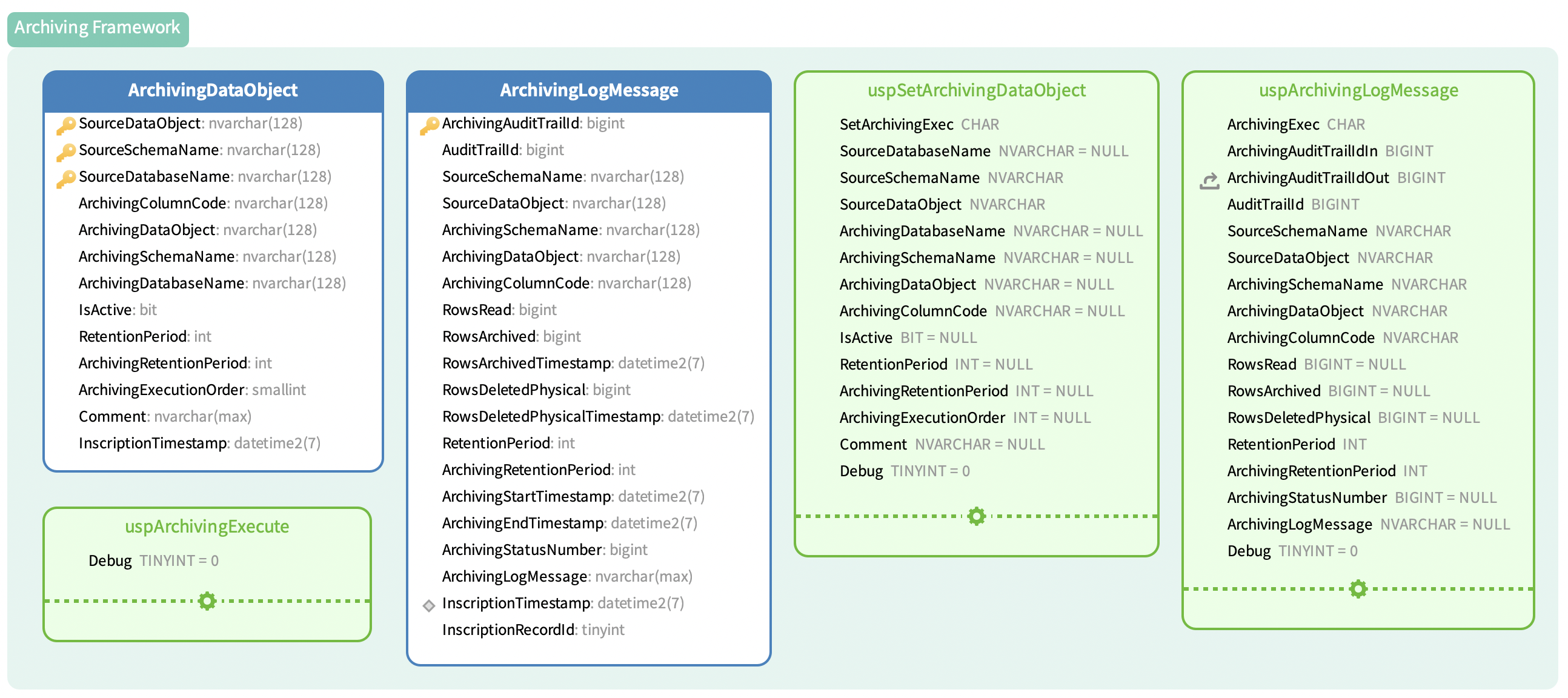
Next Steps:
- Review Best Practices for optimization recommendations
- Explore uspSetArchivingDataObject for detailed registration options
- Check uspArchivingExecute for execution details